We’ve gathered the most common questions and issues here. If something’s not working, check below first.
Nothing is happening when I highlight the text
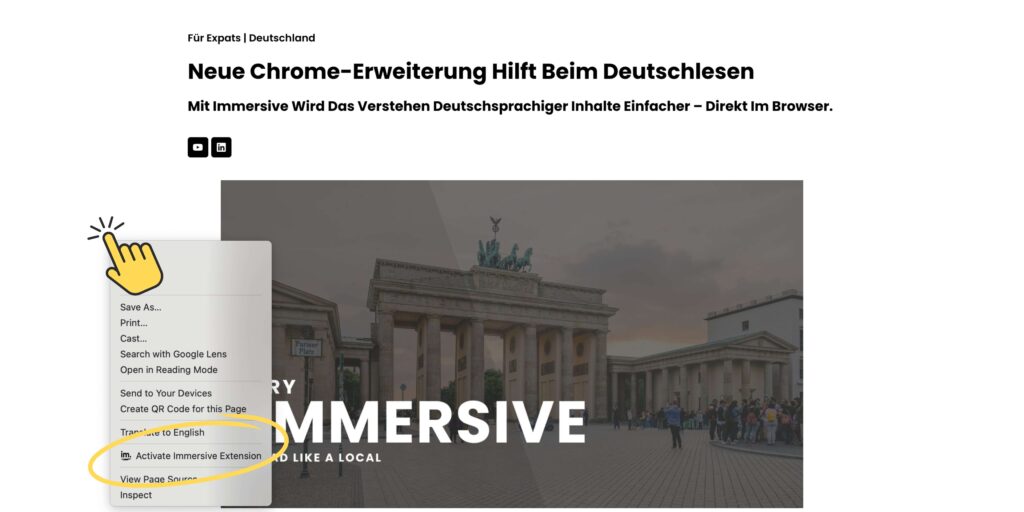
Once you install the extension and sign up, you need to activate the extension on each website. To do that:
• Click anywhere on the website (outside of any text) to activate the extension for that specific URL. • If you refresh the page, you will need to activate it again. • If nothing happens after activating, make sure you are activating the extension every time you visit a new website. The extension must be activated per website and per session.
Why do I keep getting logged out?
For security reasons, the extension only keeps you logged in for one hour. After that, you’ll be automatically logged out and will need to log in again.
This helps protect your data and activity. We’re working on extending this time limit, but for now, this is the current behavior.
The extension doesn’t work on [specific website]
Our extension is built to work mainly on German websites with German content. However, a few things might cause issues:
• The site may have content blockers or protections that interfere with Immersive. • Other browser extensions (like pop-up blockers or content scripts) may conflict with Immersive.
Tip: Try disabling other extensions temporarily to see if it makes a difference.
After signing up with Google, I can’t log in
If you signed up using Google and now can’t log in, try this workaround:
• Use the same email address you signed up with, but choose log in with email (instead of Google). • We’re investigating the issue. Thanks for your patience.
I’m getting an error after clicking Simplify or Translate
If an error appears when trying to simplify or translate text: • This might be due to an incomplete API call. • Try refreshing the page, then reactivate the extension, and try again.
If it still doesn’t work, let us know.
I can’t find Immersive in other web browsers
At the moment, Immersive is only available for Google Chrome. We’re working on making it available on other browsers, but for now, Chrome is the only option.Lorem ipsum dolor sit amet, consectetur adipiscing elit. Ut elit tellus, luctus nec ullamcorper mattis, pulvinar dapibus leo.